.svg)
Updated: April 17, 2026
Tags: Organize and Manage Your Purchased Property Data
Tags help you keep your purchased property data organized, searchable, and ready for export. By assigning tags to your data, you can quickly locate specific groups of properties and streamline your workflows.
What Are Tags?
Tags are customizable labels you can apply to purchased data. They allow you to group properties based on criteria.
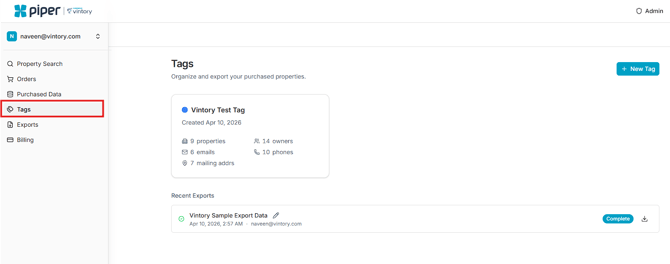
Once applied, tags make it easy to filter and retrieve data whenever you need it.
Create a Tag
To create a new tag:
- Navigate to Tags in the Navigation menu.
- Click + New Tag
- Enter a Name for your tag and select the desired Color
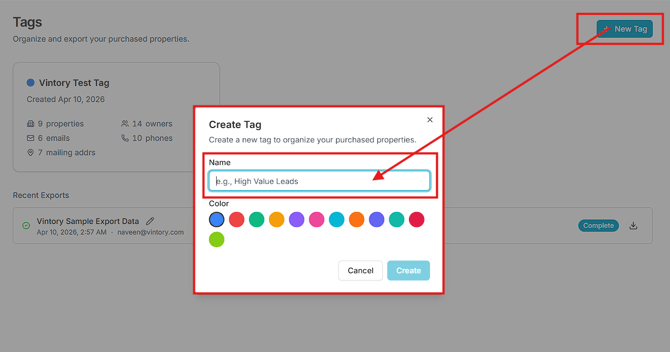
- Click Create
Your new tag will be saved and available for use immediately.
View Tag Details
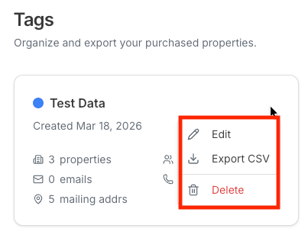
Each tag includes a summary of the data associated with it. This helps you quickly understand what’s inside without opening the full dataset.
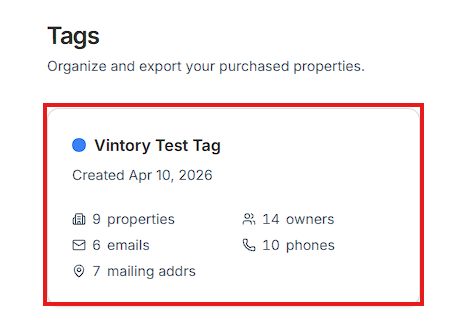
For every tag, you can see:
- Total number of properties
- Associated emails
- Mailing addresses
- Property owners
- Phone numbers
Editing Tags
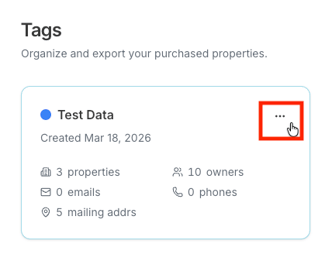
You can edit a tag by selecting the three dots next to it. Here you can choose to edit the name and color, export the tagged data, or delete the tag completely.
Why Use Tags?
Using tags allows you to:
- Quickly search for previously purchased data
- Organize properties by market, campaign, or strategy etc.
- Filter data for exports or outreach
- Maintain a clean and structured database