.svg)
Billing: Manage Your Credits
The Billing section gives you a clear overview of your organization’s credit usage and purchase activity. This is where you can track your available credits, review past credit pack purchases, and purchase more data packs.
What You Can See in Billing
Inside the Billing tab, you’ll find:
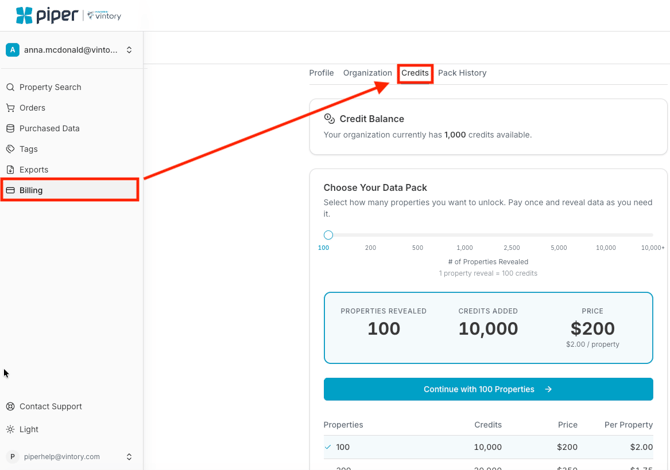
- Available Credits
Displays the number of credits currently available for purchasing data. - Purchasing additional Data Packs
You can select a data pack to purchase additional credits.
View Credit Pack Purchase History
The Billing section also includes your Pack Purchase History, where you can:
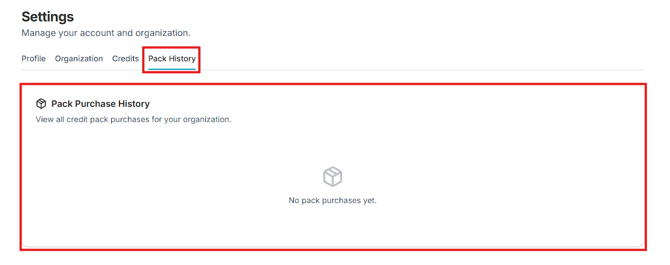
- Review all credit pack purchases made by your organization
- Maintain visibility into billing activity
This makes it easier to manage your budget and monitor usage across your team.
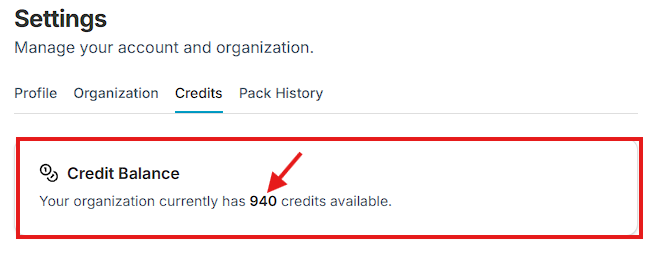
Credit Balance Example
If your account shows 940 available credits, this means you currently have 940 credits ready to use for purchasing property data.
Why This Matters
Keeping track of your billing and credits allows you to:
- Ensure you have enough credits before making a purchase
- Monitor spending and usage trends
- Maintain transparency across your organization